The broadcast encoder that keeps streaming when a stream doesn't
One audio input, as many independent destinations as you need, live diagnostics, silence handling and a restrained predictive Auto Gain, built for unattended operation. It does one job, and it does it all night without asking for attention. Clingy software is for other people.


Animated diagram: one programme feed enters NG Encoder and fans out to four destinations. Every few seconds one destination drops and reconnects on its own while the others keep streaming.
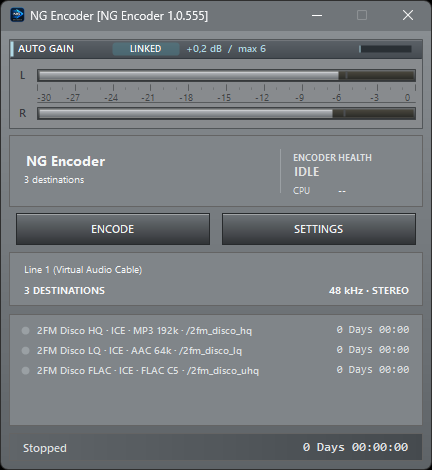
Capture once. Encode independently. Send the same show to different servers, codecs and bitrates, with every destination operationally isolated from the others. One show in, as many streams out as your server can take.
Feed NG Encoder from playout, your processor, a virtual audio cable or studio routing. The input format is shared; each stream gets its own encoder. It is not picky about where the audio comes from. It is very picky about what it does with it.
Icecast and SHOUTcast destinations connect and recover independently. While the show is on air you add, edit, reconnect or remove a single destination from the STREAMS list without touching the others. Some encoders treat the backup stream as a hostage. This one doesn't.
Build the mix that fits your listener base and bandwidth budget. From the listener on a 2012 smart speaker to the one with a lossless habit.
The other destinations never stopped, and the one that dropped reconnected on its own. That is not luck. That is the design.
A restrained, linked gain rider for already-processed programme audio. It looks ahead, adds level only where there is room, and leaves the real sound processing to the processor upstream. Already running a big-name box upstream? Keep it. We are polite like that. For now.
NG Processor is our own broadcast audio processor. Next to the standalone application it ships as one optional plugin DLL: drop NGProcessorPlugin.dll and the Presets folder beside NGEncoder.exe, and the complete chain runs on the shared input before a single byte is encoded. One DLL. That is the entire rack.
The plugin is the same native processing core as the standalone product. It processes the audio after capture and before the destinations fan out, so every stream hears exactly the same processed signal. Encoder Auto Gain steps aside automatically while the Processor is active. They never argue about who is in charge.
The certified factory personalities are plain JSON files in the Presets folder, identical to the standalone application. Tune a preset in NG Processor, copy the file, and the encoder plays it. The Processor section appears in Professional Settings, Operations, as soon as the DLL is present. No installer wizard, no reboot, no ceremony.
Open STREAMS, pick a preset in the NG PROCESSOR panel and press Apply. The plugin prepares the new sound in the background and crossfades on one source moment; the destinations never notice, the listeners hear a station that just got better. Within the same engine, no restart, no gap. Some encoders make you disconnect to change a knob. Not this one.
The plugin is a licensed feature and requires an NG Encoder license with the plugin entitlement. Learn more at ngprocessor.com.
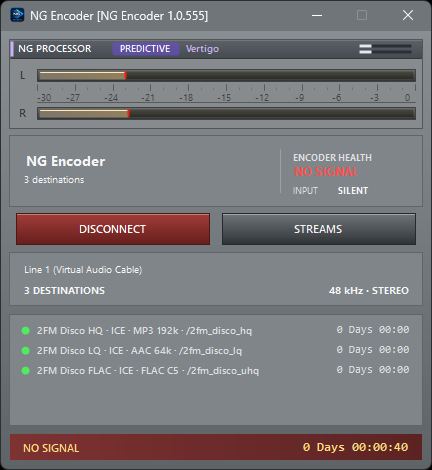
The status changes the moment audio disappears. If configured, NG Encoder disconnects after a longer silence delay and reconnects only after a stable signal has returned. You hear about silence from your encoder, not from your listeners.
The moment the input goes quiet, NO SIGNAL lights up, long before any disconnect timer runs out. You know first, and you decide. Your listeners don't need to phone it in.
A recovered signal can be required to stay stable for a set period before NG Encoder reconnects. A short glitch is not enough to declare the input healthy again. Trust is earned, even by audio.
NG Encoder watches CPU load, queue pressure at every destination, audio-clock drift, dropped audio and stalls. The moment the cause is gone, health recovers toward GOOD, without flickering at the boundary. No red light that stays on for three days because nobody dared to press reset.
Health state and cause transitions are written to Detailed Logging as well, so an unattended encoder still leaves a useful history even if nobody ever opens the window. Which, frankly, is the goal.
After a destination has been online successfully, later network loss is recovered automatically without taking healthy outputs offline. A single stream can also be reconnected, paused or replaced by hand, live. The night shift gets to sleep.
Auto Gain, PCM and float conversion, the streaming interpolation, mono mixing and the dither run in the native encoder core since 1.0.560: the same bit-exact audio, far less work for the .NET runtime, and fewer pauses where pauses are not welcome.
Optional capture-device recovery for USB interfaces and virtual audio endpoints that briefly reset or disappear. USB interfaces have their moods. We don't take it personally.
A guarded disconnect keeps an accidental click from instantly taking a healthy broadcast off air. Because "I just clicked it" is not an incident report.
Daily logs keep connections, health transitions, metadata problems and recovery events, with configurable retention. So the morning meeting is about facts, not feelings.
Write the shared audio feed to local MP3 while the broadcast runs. Proof, for when somebody claims it sounded different yesterday.
Route the shared signal to a Windows output device to hear exactly what reaches the encoders. No guessing. Guessing is for the competition.
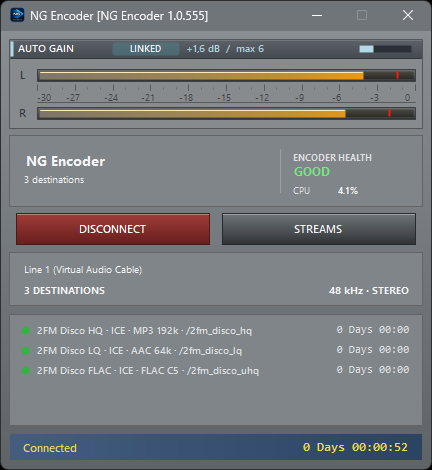
Quick start, codecs, Icecast, SHOUTcast, multi-destination operation, metadata input, Silence Detection, Auto Gain, Encoder Health, logging, troubleshooting and commissioning. Yes, we wrote it all down. Somebody had to.
2FM streams all five of its editions through NG Encoder, several destinations each, plus the five 2FM backup streams. Unattended, around the clock.